A Google title tag ranks and gets clicked when it puts the keyword in the first 50 characters, states a benefit and stays under 60 characters. The rest of this guide is detail on those three rules.
Why do title tags matter?
Google sometimes rewrites title tags in its results, but yours is still one of the most important elements on the page. It appears in three places:
- Google search results (the blue link)
- Browser tabs
- Social media previews
If your title tag fails, you lose clicks before the reader even sees your page.
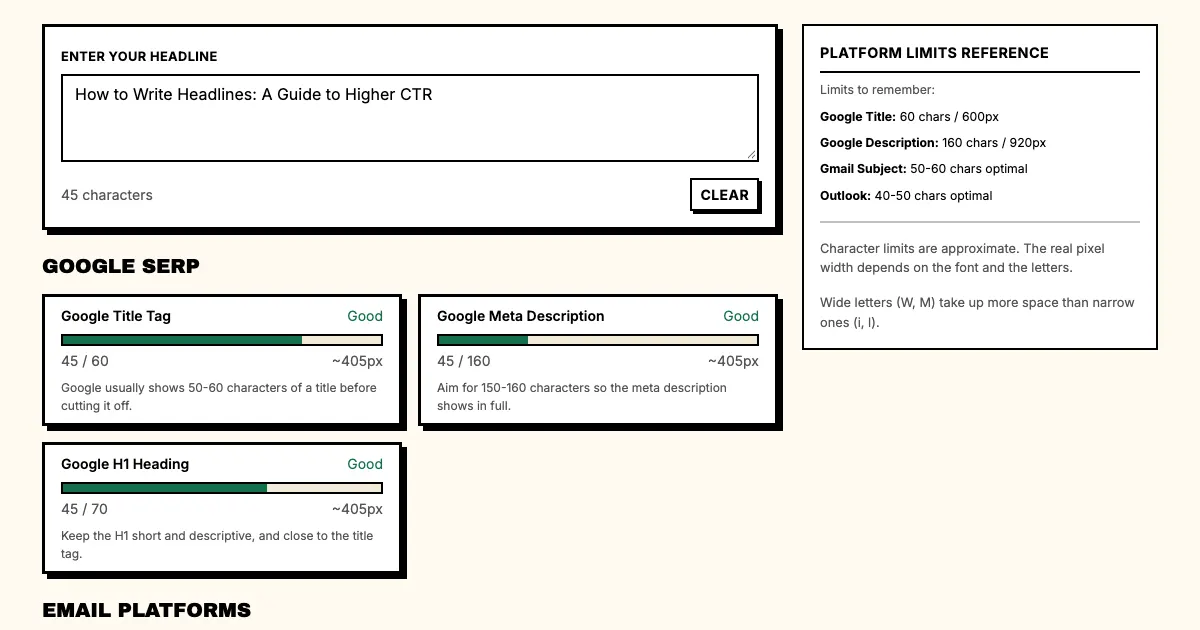
How does Google display title tags?
Google shows about 600 pixels of title tag text, which works out to roughly 50-60 characters on average.
The exact count varies. Capital letters take more space, so "HTTPS" takes up more room than "https".
Google may also rewrite your title tag if it doesn't match the search query. That happens when Google believes another version of your title would better match user intent.
In practice, write for 50 characters, knowing that 60-70 characters might display.
What is the title tag formula?
The title tags that work best follow one structure:
[Primary Keyword]: [Secondary Keyword | Brand Name]
Or, for longer tags:
[Primary Keyword: Specific Benefit | Brand Name]
Example: "How to Write Headlines That Get Clicks | Punchd"
It puts the primary keyword at the start, gives a specific benefit and includes the brand name for recognition.
Where does the keyword go in a title tag?
Put keywords first
Google gives more weight to words at the beginning of the title tag. The first 40-50 characters matter most.
Weak: "The Complete Guide to Writing Headlines That Convert"
Strong: "How to Write Headlines: A Complete Guide for SaaS"
The keyword ("write headlines") appears earlier in the strong version.
Include one primary keyword
Pick one primary keyword phrase and use it, instead of stuffing several keywords into the title tag.
Weak: "Headline Writing, Email Subject Lines, and Ad Headlines Guide"
Strong: "How to Write Headlines That Convert [Guide]"
Match search intent
Google rewrites title tags when they don't match search intent. If you're targeting "how to write headlines," your title should look like an instructional guide.
For an informational query, include the query and a word that signals educational intent ("Guide," "How to," "Tutorial"). For a transactional query, include the product category and a benefit ("Best Headline Generator for SaaS"). Our search marketing headlines use case shows how to keep that keyword in the title, the ad and the landing page.
How do you raise the click-through rate of a title tag?
Ranking #1 doesn't matter if nobody clicks. Your title also competes with the ad headlines above it, so it has to earn the click on its own.
Add relevance without hype
Weak: "The Ultimate Guide to Headlines"
Strong: "Headline Writing Guide for 2026, With SaaS Examples"
Nobody can check "ultimate". "2026" tells the reader the page is current, and "SaaS examples" tells them who it is for.
Be specific
Weak: "Headline Writing Tips"
Strong: "Headline Writing: 15 Formulas With SaaS Examples"
Specific numbers and claims are more credible, and "SaaS examples" tells the reader what they'll find.
Put the brand name at the end
A brand name at the end of the title tag improves recognition without hurting SEO.
Format: [Main title] | [Brand]
Example: "How to Write SaaS Headlines That Convert | Punchd"
What are the common title tag mistakes?
Mistake 1: Keyword stuffing
Google rewrites title tags that stuff keywords. Two or three repetitions of "headline" in one title tag is a red flag.
Bad: "Headline Generator | Headline Writer | Headline Tool | Punchd"
Mistake 2: Truncation
If Google cuts off your title tag in the results, the most important information is lost. Before you write, plan for truncation at 50 characters, and check the count in our free headline length checker.
Mistake 3: Writing for SEO only
Title tags written only for search engines often fail to get clicks, and a title tag that ranks but doesn't get clicked is worse than no ranking at all.
Write for humans first. Search engines keep getting better at understanding intent, so a title tag that serves humans usually serves SEO too.
Mistake 4: Ignoring the meta description
The title tag gets the click and the meta description confirms it, so write both. Our guide on how to write meta descriptions covers the second half.
What are good title tag templates?
For how-to content
"[Action]: [Specific Benefit] [Year | Guide]"
Example: "How to Write Headlines: A Guide to Higher CTR"
For list posts
"[Number] [Topic] That [Specific Outcome]"
Example: "15 Headline Formulas That Double Click-Through Rate"
For tool/product pages
"[Best | Top] [Category] for [Specific Audience]"
Example: "Best Headline Generator for SaaS Teams"
For comparison pages
"[Product A] vs [Product B]: Which [Category]?"
Example: "Punchd vs Jasper: Which Headline Generator Wins?"
FAQ: Google title tags
Q: Should I include my brand name in every title tag?
A: Yes, on primary pages. On blog posts, put the brand at the end; on the homepage, putting the brand name first is fine.
Q: Can Google change my title tag?
A: Yes, and it's normal. Google rewrites a title tag when the original doesn't match search intent or when it believes another version would serve users better.
Q: How do I prevent Google from rewriting my title tag?
A: Make the title tag describe the page content clearly and include the primary keyword. If Google still rewrites it, the rewrite is usually better.
Q: How often should I update title tags?
A: Review them quarterly, and update a title tag when keyword intent changes, when its performance drops or when Google's rewriting behavior changes.
What should you do now?
- Pull your top 10 pages by traffic.
- Check each title tag character count.
- Identify any title tags that exceed 60 characters.
- Rewrite title tags that are truncated or underperforming.
- Track ranking and CTR changes after updating.
Sources
- Google Search Central: title links
- MDN Web Docs: the title element
- Wikipedia: Search engine optimization
Check your title tags and headlines. Use the Headline Length Checker: verify character counts for Google and all major platforms.