Headline Length Checker
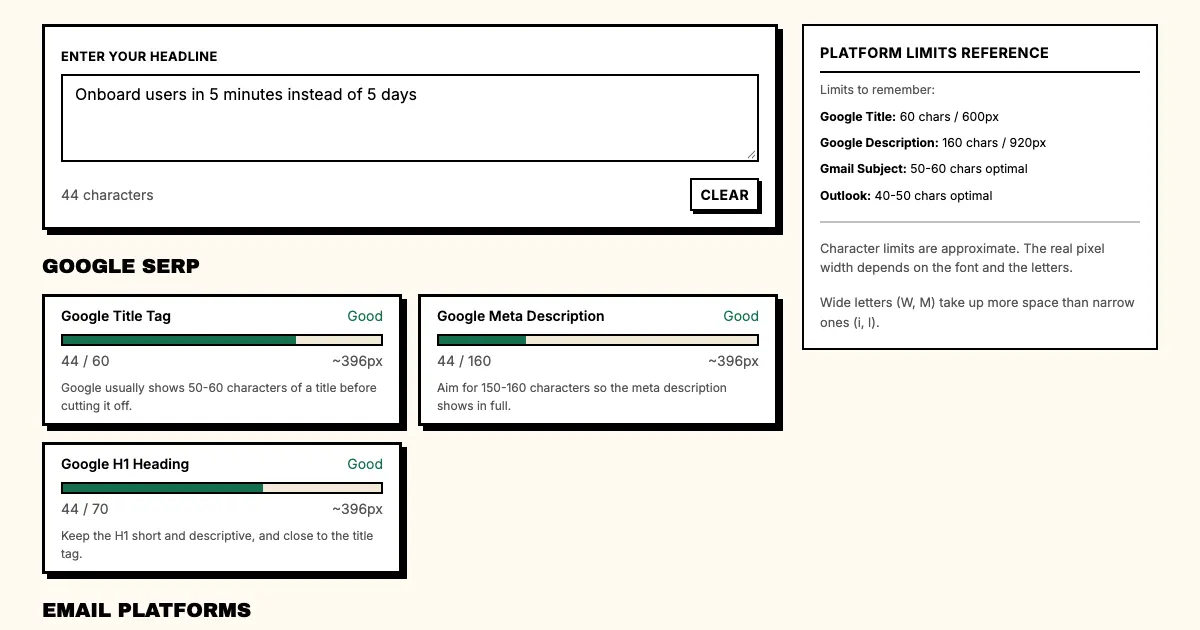
This headline length checker shows where a headline fits and where it gets cut off: up to 60 characters for a Google title, 40 to 60 for an email subject line and about 140 before LinkedIn cuts a post. Paste a headline below to see it for each platform at once.
Google SERP
Google usually shows 50-60 characters of a title before cutting it off.
Aim for 150-160 characters so the meta description shows in full.
Keep the H1 short and descriptive, and close to the title tag.
Email Platforms
Gmail shows about 70 characters in the preview. Aim for 50-60.
Outlook shows about 50-60 characters in the inbox before cutting the subject off.
Apple Mail on macOS and iOS truncates around 65 characters.
Social Media
X posts can be up to 280 characters. Aim for short, direct copy.
LinkedIn allows 3000 characters but shows ~140 in preview.
Facebook shows about 477 characters before it cuts the post at 'See More'.
Limits to remember:
- Google Title: 60 chars / 600px
- Google Description: 160 chars / 920px
- Gmail Subject: 50-60 chars optimal
- Outlook: 40-50 chars optimal
Character limits are approximate. The real pixel width depends on the font and the letters.
Wide letters (W, M) take up more space than narrow ones (i, l).
How long should a headline be?
A headline gets a split second to make someone stop scrolling, and its length affects whether it does. The limits come from how each platform renders text, how people scan a page and how algorithms decide what gets seen.
Google shows titles differently on different devices. On desktop you usually get about 600 pixels of width, roughly 50 to 60 characters depending on the letters. Wide letters like W and M take more space than narrow ones like I and l, because Google measures pixels rather than counting characters. A title in mostly capital letters gets cut off sooner than one in lowercase.
The meta description has its own limit: about 920 pixels, or 150 to 160 characters. It appears below your title in search results. It doesn't directly affect rankings, but it has a big effect on click-through rates, and a strong description that matches your content can double your organic traffic. Write it as a specific promise to a reader who is deciding whether to click.
Email subject lines are harder to plan for. Gmail and Outlook render them differently on each device. On mobile you may see only 30 to 40 characters before the subject line is cut off, while desktop shows more, sometimes 70 or 80. The platforms allow 255 characters, but that limit doesn't help if the line is cut off before it makes sense. Professional email marketers aim for 40 to 50 characters so the whole line shows wherever it is opened.
Check every headline against these limits before it goes out. A headline that fits Google well may be too long for email, or the other way round. A/B tests show which lengths work best for your audience and industry; track open rates, click-through rates and bounce rates to see what works.
Character counters are everywhere, but checking pixel width is harder. Characters vary in width: twenty W characters take up far more space than twenty i characters, so a plain character count can mislead you. You need a tool that estimates pixel width or shows a preview of the headline on each platform.
Mobile has changed the numbers. More than sixty percent of searches now happen on mobile devices, and mobile results show less than desktop ones. On a small screen your title may be cut to 40 or 50 characters, and Google may leave out the meta description entirely if it decides your page doesn't need one. Write for mobile first, then adjust for desktop if you need to.
Length also changes how a headline feels. Short headlines feel urgent and grab attention, which suits time-sensitive content, breaking news and impulse readers. Longer headlines give more context and appeal to readers who are already interested, which suits evergreen content, complex topics and audiences doing research.
A cut-off headline tells readers there is more to see. Done on purpose, that creates curiosity and makes people click for the full story. Done by accident, it looks unprofessional, as if you never checked how the headline looks on each platform. Preview your headlines on several devices before you publish.
SEO and readability sometimes pull against each other. Exact-match keywords in a headline help rankings but can force awkward phrasing. A more general headline that works the keywords in naturally may read better but has a harder time ranking. The right balance depends on your search volume goals, the competition and what your audience expects.
Over time your analytics will show patterns. Track which headline lengths get the most engagement for each content type on the platforms you use. A technology blog might peak at 55 characters and a news site at 40, while a retail site might do better with longer descriptive titles that name the product and its benefit.
Think about accessibility too. Screen readers handle content differently from visual browsers, and a headline that reads fine on screen can sound awkward aloud. Even phrasing with clearly separated words helps both people who scan and people who listen. Read your headlines aloud before you publish.
Competition for attention grows every year. The average person sees thousands of marketing messages a day, and your headline has two seconds to work. Length is part of that, along with clarity, specificity and relevance. Good headlines are as short as they can be while still saying as much as possible.
The platforms keep changing. Google updates how it displays and cuts off search results, email clients change their preview panes, and social platforms adjust their character limits and display algorithms. What worked last year may do worse next year, so keep up with the changes and keep testing.
Fitting the limit is only part of the job. The headline also has to be clear, make the reader act and respect their time. Work within the length limit without trying to hit it exactly: sometimes shorter wins, and sometimes the reader needs more context. Know your platforms and your audience, and keep testing.
Keep these limits at hand when you draft. Check titles and descriptions against Google's limits, check how subject lines display in the major email clients, and preview social posts in the feed. Write down what works for you so your team builds up its own knowledge. Over time this adds up to clear gains in organic visibility and engagement.
These numbers are averages and recommendations. Your results depend on many things, including your industry, keyword competition, how your audience behaves and the quality of your content. Start from these guidelines and adjust them based on real performance data. The most successful content marketers treat the limits as flexible.
Frequently asked questions
How long can a Google title be?
Google shows about 50 to 60 characters, or 600 pixels, of a title before it cuts it off. Keep the keyword and the promise inside the first 50 characters.
How long should an email subject line be?
Between 40 and 60 characters. Gmail shows about 70 in the inbox, Outlook about 50 to 60 and Yahoo Mail about 50, so the shorter end is safe everywhere.
Why does the checker count pixels as well as characters?
Google and email clients cut by width, not by character count. A title full of wide letters like W and M is cut earlier than one with narrow letters.
Does a long headline hurt rankings?
No. A cut-off title only hurts clicks, because the reader does not see the whole promise. Length is a display limit, not a ranking signal.
Related reading
- How many characters should a headline be?
- How to write Google title tags
- How to write email subject lines
- Email Subject Line Analyzer
Sources
- Google Search Central: how title links are shown
- Google Search Central: snippets and meta descriptions
- MDN Web Docs: the <title> element
Written by Punchd Team: Growth and content marketers who have run copy and conversion work at SaaS companies from seed stage to Series C. We built Punchd for that work. Last updated 2026-10-16.