The ideal headline length depends on the platform: up to 60 characters for a Google title, 40 to 60 for an email subject line and about 140 before a LinkedIn post is cut. Write for the tightest limit your headline must fit.
Why is headline length a tactical decision?
Platform constraints set headline length more than preference does.
Google displays 50-60 characters before truncating your title tag. Email clients show 40-70 characters depending on the platform. LinkedIn shows 140 characters before the "See more" cutoff.
If your headline exceeds these limits, it gets cut, and the cut often removes the most important part: the promise or the call to action.
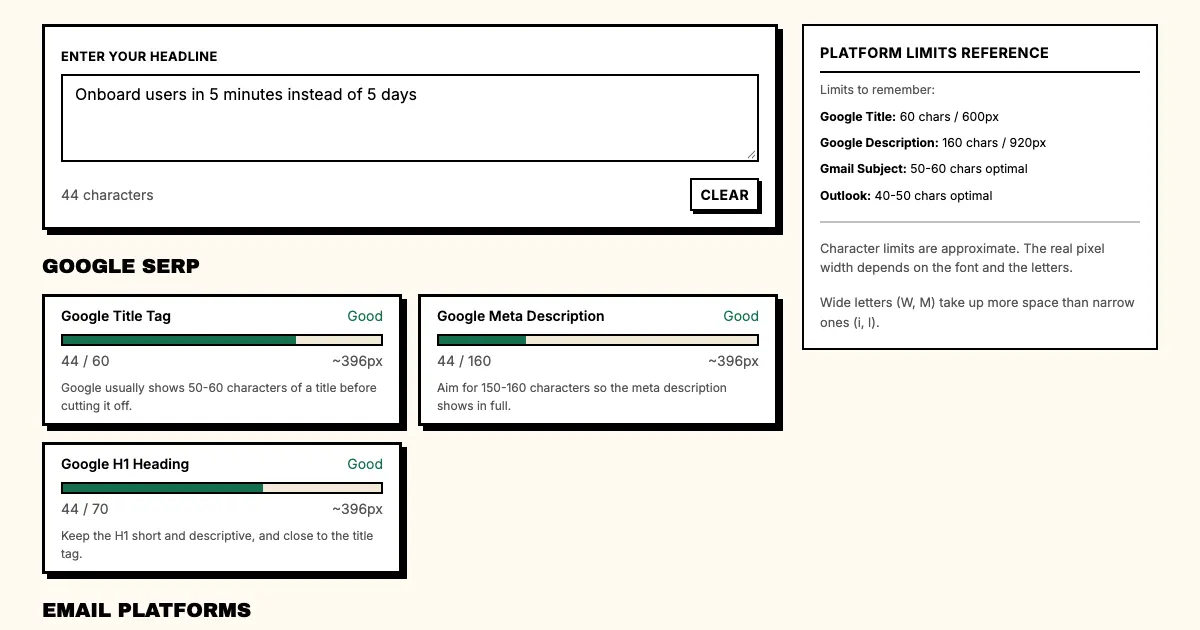
What are the headline length limits per platform?
Google SERP
Google displays approximately 600 pixels of title tag space, which works out to 50-60 characters on average.
The exact number depends on your letters. Capital letters take more space, and wide letters like W and M use more pixels than narrow letters like I and l.
Google sometimes shows longer titles, but the practical limit remains around 55 characters for reliable full display.
Target: 50-55 characters for Google titles.
To test your headlines, paste them into our free headline length checker, which shows each platform's character limit as you type. For titles full of wide letters, also preview the pixel width.
Meta descriptions
Meta descriptions don't directly affect rankings, but they do affect click-through rates. A well-written meta description that displays fully outperforms a truncated one every time.
Google typically shows 155-160 characters of meta description text.
Target: 150 characters for meta descriptions.
Email subject lines
Email clients vary widely in how much of your subject line they display:
- Gmail desktop: ~70 characters
- Gmail mobile: ~40 characters
- Outlook desktop: ~60 characters
- Apple Mail: ~65 characters
- Yahoo Mail: ~50 characters
Target: 40-50 characters for email subject lines, so they display fully across all platforms. Our guide to email subject lines covers what to put in those characters.
Social media
- LinkedIn: 140 characters before "See more"
- Twitter/X: 280 characters (but display is limited in feeds)
- Facebook: 477 characters before truncation
Target: under 100 characters, so social headlines display well in mobile feeds.
How do you test headline length?
Step 1: Count characters
Start with a simple character count. Most word processors and text editors show it in the status bar.
Step 2: Estimate pixel width
Character count alone isn't enough. A 50-character headline in all capital letters takes up more space than a 50-character headline in all lowercase.
Use a pixel-width estimator tool or preview your headline in a browser.
Step 3: Preview on platform
The only way to know if a headline displays fully is to see it on the platform itself. Search Google for the title tag, open your email in Gmail and Outlook, and check how it appears on mobile.
Step 4: Identify cutoff points
When a headline gets truncated, the cut typically happens at the end of a natural phrase or word. Plan for truncation by putting the most important words at the beginning.
What are the common length mistakes?
Mistake 1: Writing to the limit from the first draft
Write first, then trim. Trying to write within constraints from the start leads to overly cautious, short headlines.
Mistake 2: Ignoring mobile
Desktop email clients show more characters than mobile ones. If your audience reads email on mobile (most do), your subject line needs to work on small screens. The same goes for automated messages such as onboarding emails.
Mistake 3: Overestimating space
A "headline" can be 200 characters; a "Google title tag" is 50-60 characters. Always write for the smallest display.
Mistake 4: Trimming the wrong end
When trimming headlines to fit, writers often cut from the front, but the beginning of the headline is the most important part. Cut from the end to preserve the hook.
"Onboard users in 5 minutes instead of 5 days, with no setup calls or training" is too long for a Google title or a mobile inbox. Cut from the end and "Onboard users in 5 minutes instead of 5 days" keeps the core promise.
How long should a headline be for each use case?
| Use case | Target length |
|---|---|
| Google title tag | 50-55 characters |
| Meta description | 150 characters |
| Email subject line | 40-50 characters |
| LinkedIn post | 100 characters |
| Landing page H1 | 8-12 words |
| Ad headline | 30-40 characters |
FAQ: Headline length
Q: Does Google count characters or pixels?
A: Pixels. The limit is about 600 pixels, which is 50 to 60 characters for most titles. Wide letters use the space faster.
Q: What is the shortest a headline should be?
A: About 30 characters. Below that, there is rarely room for a benefit.
Q: Should the H1 match the title tag?
A: They should share the keyword and the promise. The H1 can be longer, since it has no display limit.
What should you do now?
- Pick one of your main landing pages.
- Check the current title tag length.
- Preview how it displays in Google search results.
- Trim until it displays fully without truncation.
- Check the same for your email subject lines.
Sources
- Google Search Central: title links
- Nielsen Norman Group: writing headlines, page titles and subject lines
- Google Search Central: meta descriptions and snippets
Check headline length across all major platforms. Use the Headline Length Checker: see where Google, email inboxes and social feeds cut off your headline as you type.