Here is how to write meta descriptions that get clicked: confirm the title's promise, add one specific detail and stay under 155 characters. Google rewrites weak ones, so write yours to match the search intent.
Why do meta descriptions matter?
Your title tag makes the promise and gets the click. The meta description confirms the click by explaining what the reader will get when they arrive.
Google shows about 155-160 characters of meta description text, and that is all the room you have. Search ads get even less: 90 characters per description, as our guide to ad headlines explains.
How does Google use meta descriptions?
Google doesn't use meta descriptions as a ranking factor. It uses them for the search snippet, the text below your title tag in the results.
Google also rewrites meta descriptions often. When your page contains text that matches the search query more closely, Google may show that text instead of your meta description. Your meta description is a suggestion, and Google will rewrite it if it doesn't match search intent.
So write it for the people searching. The best meta descriptions are written for users, and if Google rewrites yours anyway, the rewrite will likely still serve users because it matches their intent.
What is the meta description formula?
The meta descriptions that work best follow this structure:
[Specific promise] + [Supporting detail] + [Action signal]
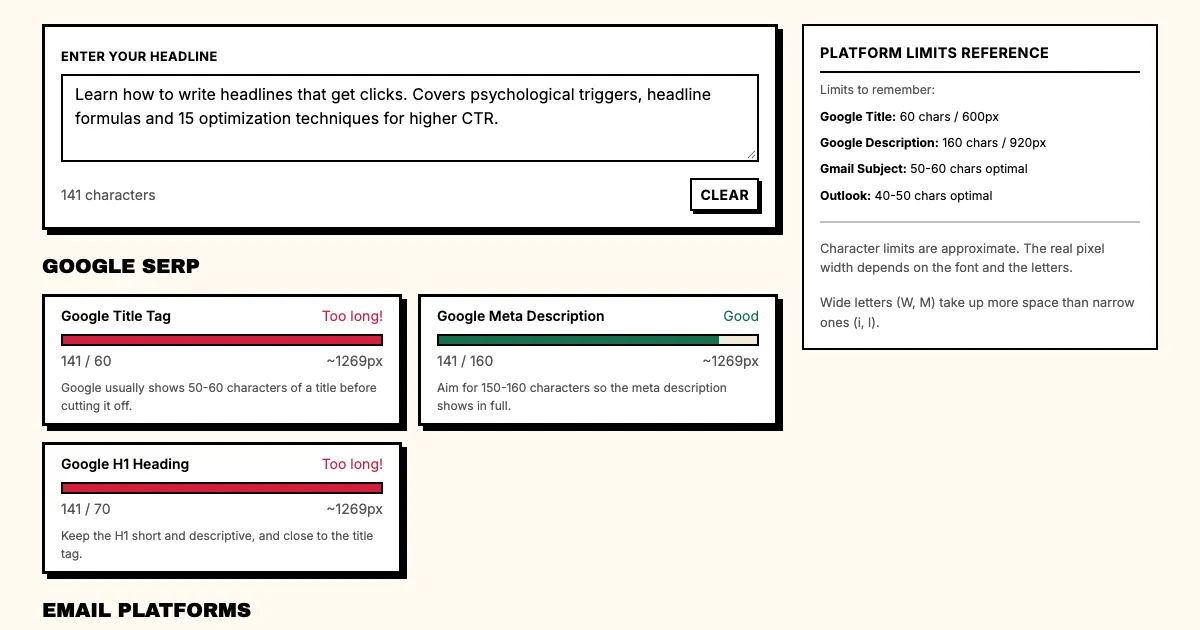
Example: "Learn how to write headlines that get clicks. Covers psychological triggers, headline formulas and 15 optimization techniques for higher CTR."
The example makes a specific promise ("write headlines that get clicks"), adds supporting detail (what the content covers) and carries an action signal in "learn".
Which techniques improve click-through rate?
Technique 1: Include a specific number
A number makes the description specific and credible.
Weak: "Tips for writing better headlines"
Strong: "15 headline formulas that double your click-through rate"
"15" is an exact count, and "double your click-through rate" is a specific outcome.
Technique 2: Name the content type
Readers scan for the content type. "Guide" signals depth, and "cheat sheet" signals a quick reference.
Weak: "How to write headlines"
Strong: "The complete guide to writing headlines that convert in 2026"
"Complete guide" signals depth and "2026" signals freshness, so the reader knows what to expect.
Technique 3: Include a call to action
Meta descriptions can include implied CTAs.
Weak: "Headline writing tips for SaaS teams"
Strong: "See the headline formulas SaaS teams use to get more clicks. Start optimizing today."
"Start optimizing today" works as an implied CTA and pushes the reader to act.
Technique 4: Match search intent
Your meta description should match what the searcher is looking for.
Query: "how to write headlines that convert"
Weak description: "Learn about headline writing from our expert team."
Strong description: "Learn how to write headlines that convert. Includes formulas, A/B testing steps and real SaaS examples."
The strong description mirrors the search intent: it contains the keywords ("write headlines that convert") and then expands on the promise.
What are the common meta description mistakes?
Mistake 1: Exceeding character limits
Google truncates meta descriptions over 155-160 characters. Write for 150 characters to be safe, and check the count in our free headline length checker as you type.
Mistake 2: Duplicate meta descriptions
Give every page a unique meta description. Identical descriptions don't help searchers tell your pages apart, as Google's own snippet guide points out.
Mistake 3: Ignoring mobile
Mobile search results show fewer characters than desktop, so write for mobile first.
Mistake 4: Writing only for SEO
Meta descriptions written only for search engines often sound unnatural. Write for humans first; Google rewards natural language.
Mistake 5: Not updating meta descriptions
Review the meta description whenever the page content changes. An outdated one misrepresents the content.
What are good meta description templates?
For how-to content
"[Action verb] + [specific outcome] + [key techniques]"
Example: "Learn how to write headlines that get clicks: the psychological triggers, formulas and A/B testing steps behind them."
For list posts
"[Number] + [topic] + [specific benefit]"
Example: "15 headline formulas used by top SaaS marketing teams. Includes templates, examples, and conversion optimization techniques."
For tool/product pages
"[Specific outcome] + [proof or guarantee] + [CTA]"
Example: "Generate 20 conversion-focused headlines in 30 seconds. Free to use. No signup required."
For comparison pages
"[Product A] vs [Product B]: [specific comparison point]"
Example: "CoSchedule vs Punchd for headline optimization. Which tool improves your click-through rate? Our full comparison."
FAQ: Meta descriptions
Q: Should I include keywords in my meta description?
A: Yes, naturally. Include your primary keyword: Google bolds keywords that match the query, which increases CTR. Don't stuff keywords, though, because it reads poorly and Google may rewrite it.
Q: How long should a meta description be?
A: 150 characters. That length displays on all devices and lowers the risk of truncation.
Q: Does Google always use my meta description?
A: No. Google rewrites a meta description when the page content matches the search query better. That's normal, and the result is usually better.
Q: Should every page have a meta description?
A: Yes. Every page that should rank in search needs a unique meta description.
What should you do now?
- Pull your top 10 pages by organic traffic.
- Check each meta description length.
- Rewrite any that exceed 155 characters.
- Rewrite any that don't include a specific promise.
- Track CTR changes after updating.
Sources
Check your meta descriptions and headlines. Use the Headline Length Checker: verify character counts for Google and all major platforms.