Onboarding emails get opened and acted on when the subject line names the next step and what the user gets for taking it. The 14 formulas below show how, with a before-and-after rewrite for welcome, progress and re-engagement emails.
Your welcome email gets opened. The rest of your onboarding sequence gets ignored, and the users who signed up never come back.
Most SaaS onboarding sequences fail because their headlines treat new users as if they're already invested. They say "Welcome to Punchd" when they should say "Your first 20 headlines are ready" or "One more step and you'll have headlines to test."
Why do most onboarding email subject lines fail?
An onboarding email competes with everything else in someone's inbox: work email, promotional offers from other brands, and that newsletter they subscribed to three years ago and never read.
Your headline has about 5 words to earn the click, so it has to promise something valuable enough to get opened ahead of all that. Generic "Welcome" headlines don't manage it. Headlines that name a specific benefit do.
The rules from our guide on how to write email subject lines still apply, with one difference: a new user owes you nothing yet. Keep each line within the headline length a phone inbox shows in full, and put the benefit in the first words.
Which 14 subject line formulas drive activation?
1. The "Your account is ready" formula
Tell them what to do next instead of making them figure it out.
Before:
"Welcome to Punchd"
After:
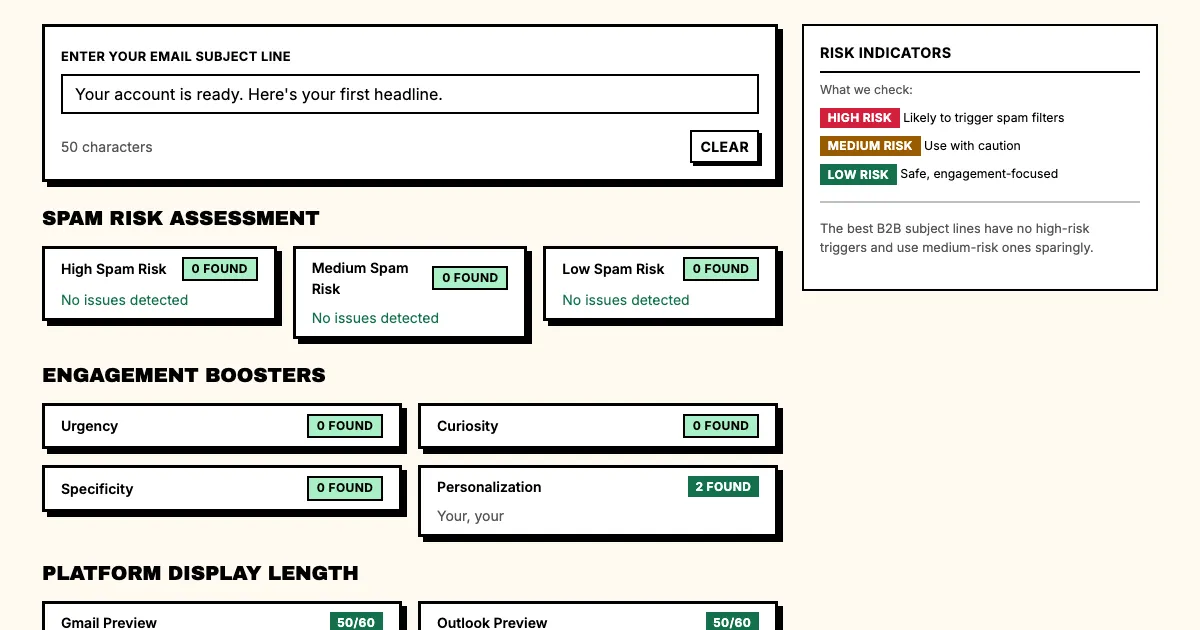
"Your account is ready. Here's your first headline."
This removes the cognitive load. The user doesn't have to work out what to do, because you've already named the next action.
2. The "Progress snapshot" formula
Show them exactly where they are in the process.
Before:
"Complete Your Profile"
After:
"You're 2 steps away from generating your first headlines."
It gives them a clear path. "2 steps" feels achievable, while "Complete your profile" sounds like a chore.
3. The "First win" formula
Celebrate the smallest win immediately.
Before:
"Account Created Successfully"
After:
"Your first batch of credits is ready. Generate headlines now, before you move on."
It celebrates the first win (credits ready to use) and gives a concrete reason to act now, before they move on to other tasks.
4. The "Social proof" formula
Show them others have succeeded.
Before:
"Welcome Aboard"
After:
"Marketers who complete setup generate 40% more leads. Here's how to join them."
It names a benefit and implies belonging. Nobody wants to be one of the users who didn't complete setup.
5. The "Clock is ticking" formula
Create urgency with a real deadline.
Before:
"Free Trial Ending Soon"
After:
"Your 7-day trial expires in 48 hours. Generate headlines before it's gone."
It names the timeframe and what they stand to lose. People ignore a generic "ending soon" warning, but a specific countdown gets them to act.
6. The "Shortcut" formula
Promise speed to value.
Before:
"New Feature Available"
After:
"Skip the manual work. Import your competitor's headlines in 2 clicks."
It names a specific frustration (manual work) and offers a specific fix (a 2-click import). Users who struggle with setup respond to shortcuts.
7. The "Re-engagement" formula
Win back inactive users.
Before:
"We Miss You"
After:
"Your 5 unused credits expire Friday. Here's what to do with them."
This reminds them of something concrete they've already paid for. Unused credits are a loss waiting to happen, and the headline turns that loss aversion into action.
8. The "Tutorial" formula
Offer step-by-step guidance.
Before:
"How to Generate Headlines"
After:
"The 3-step formula for headlines that actually convert."
It promises a repeatable process that goes beyond a feature tutorial. Users want to learn a formula they can use forever.
9. The "Feature spotlight" formula
Show them what they're missing.
Before:
"New Feature: Saved Headlines"
After:
"You haven't used the save feature yet. Here's what you're missing."
Use this to bring users back to a specific feature. It names the feature, suggests they're missing out and promises to show them what they've been skipping.
10. The "Milestone" formula
Celebrate their progress.
Before:
"Congratulations"
After:
"You've generated 100 headlines. Here's how to pick the winner."
It recognizes a specific achievement. "100 headlines" is concrete where "Congratulations" is vague.
11. The "What to do next" formula
Don't make them guess.
Before:
"Check Out Your Dashboard"
After:
"Your dashboard has 3 things worth checking. Here's where to start."
A new interface can cause decision paralysis. Giving users a specific starting point gets them past it.
12. The "Personalization" formula
Use their data to hook them.
Before:
"Weekly Digest"
After:
"Based on your industry (FinTech), here are 3 headlines your competitors haven't tested."
It shows you're paying attention to their context. Mass emails get ignored, and personalized insights get opened.
13. The "Urgency without fear" formula
Create pressure without panic.
Before:
"Last Chance"
After:
"Your credits reset Monday. Use them before the week ends."
It ties the urgency to a concrete reset cycle. "Last chance" feels like manipulation, while "Resets Monday" feels like a schedule.
14. The "Help is here" formula
Offer support proactively.
Before:
"Need Help?"
After:
"Stuck on the brief form? Here's what most users put in each field."
It names a specific sticking point (the brief form) and offers specific help (example inputs). "Need help?" sounds like a support ticket; "Here's what to put in" sounds like a friend.
What does a full onboarding email sequence look like?
A sample sequence by onboarding stage:
| Stage | Primary goal | Headline formula |
|---|---|---|
| Day 1 | Account activation | "Your account is ready" |
| Day 3 | First credit usage | "Generate your first headlines now" |
| Day 7 | Feature discovery | "3 features you haven't tried" |
| Day 14 | Re-engagement | "Your credits expire Friday" |
Multi-Stage FAQs
Q: How many onboarding emails should I send?
A: Start with 3-5 emails over 7-14 days. Send more and you risk annoying new users; send fewer and you miss the activation window.
Q: Should I use push notifications or email?
A: Use email for longer nurture sequences and push notifications for real-time triggers ("Your headlines are ready"). Most onboarding sequences work best with a combination of both.
Q: How do I personalize headlines without data?
A: Start with behavioral triggers. "You haven't used X in 3 days" works without any demographics. As users give you more data, you can layer in industry-specific or role-specific personalization.
Q: What's the best time to send onboarding emails?
A: Tuesdays and Thursdays at 10am or 2pm local time tend to perform best, but test with your own audience. Night owls might respond better to evening sends.
Q: Should onboarding emails have images?
A: Yes, as long as they're relevant. A hero image of the product UI helps orient new users and generic stock photos don't, so use screenshots of your actual interface.
Q: How do I know if my onboarding is working?
A: Track email open rate (target: 50%+), click-through rate (target: 20%+), activation rate (target: 40%+ completing the key action) and time to activation (target: under 7 days). If open rates are low, your subject lines need work; if click-through rates are low, your CTAs do; if activation rates are low, your product experience does.
What should you do now?
- Map out your current onboarding sequence (if you have one)
- List the 5 most important actions users should take
- For each action, write a "before" headline and an "after" headline using the formulas above
- Check each subject line for spam triggers and length in the free subject line tester
- A/B test the headlines over 2 weeks
- Track which headlines drive the most completions
Sources
Want headlines written for your onboarding emails? The AI headline generator writes 20 variations from one brief, for any stage of the sequence.