A SaaS pricing page converts when its headlines reframe the price as an outcome the buyer already wants. The 15 formulas below cover value framing, plan comparison and objection handling, each with a before-and-after example.
Your pricing page sits at the bottom of your funnel. The people who land there already know what you do and are ready to pay, as long as your headlines convince them your plan is worth it.
Most SaaS pricing pages fail at this stage. They hide prices behind vague phrases, bury the value in feature lists and use headlines like "Choose Your Plan" or "Simple Pricing" that tell visitors nothing.
Why do most SaaS pricing page headlines fail?
Pricing page visitors are skeptical. They've been burned by "unlimited" plans that weren't unlimited and by free trials that trapped them into paid subscriptions, and they know your competitors offer similar features.
Your job is to answer the question they're all thinking: "Why should I pay for this when I can get something similar for free?" Your headlines have to answer it, because your feature matrix won't.
The answer starts with your value proposition. If you can't say yours in one sentence, the free value proposition generator drafts one from your audience, problem and outcome.
Which 15 headline formulas work on pricing pages?
1. The "Pay once, own forever" formula
This pattern works for one-time purchases or credits, and it sets your model against subscriptions.
Before:
"Credit Packages"
After:
"Pay Once. Use Forever. Never Subscribe Again."
The second version positions your product as the anti-subscription choice, which is exactly what buyers tired of recurring charges want to hear.
2. The "ROI framing" formula
Show them the math and calculate the return before they reach the checkout.
Before:
"Startup Package - $49/month"
After:
"Startup Package - Generate 60 Headlines for Less Than a Netflix Subscription"
This reframes the price. Instead of comparing $49 to $0 (free competitors), the buyer compares it to $15-20 (a streaming service), and the number suddenly seems small.
3. The "Best value" formula
Put your best seller in the headline instead of hiding it.
Before:
"Choose Your Package"
After:
"Most Popular: The Startup Plan That Pays For Itself in One Good Headline"
It social-proofs the package and promises an ROI so specific that the price feels like an investment.
4. The "No risk" formula
Remove the fear of commitment.
Before:
"Credits Never Expire"
After:
"Buy Credits Today, Use Them Next Year. No Rush. No Auto-Renew."
This suits audiences who've been trapped by subscriptions before, because it promises outright that there's no recurring charge.
5. The "Scale up" formula
Show them the path from starter to enterprise.
Before:
"Reseller Package - 50 Credits"
After:
"50 Credits. The Agency Plan That Grows With Your Client Roster"
This works for agencies and teams. It presents the purchase as a business investment instead of a tool expense.
6. The "One punch" formula
Make the unit economics obvious.
Before:
"Starter Package"
After:
"1 Credit. 20 Headlines. The Quick Test Drive."
It breaks the transaction down into its smallest meaningful unit: one punch, twenty headlines.
7. The "Quality guarantee" formula
Promise the output quality directly.
Before:
"AI-Powered Headlines"
After:
"We Guarantee Every Headline Passes Your A/B Test. Or Your Next 20 Are Free."
A bold guarantee works for high-stakes buyers. Someone spending $100/month on content wants to know it performs.
8. The "Vs. the competition" formula
Position against alternatives by name.
Before:
"Better Than Fiverr"
After:
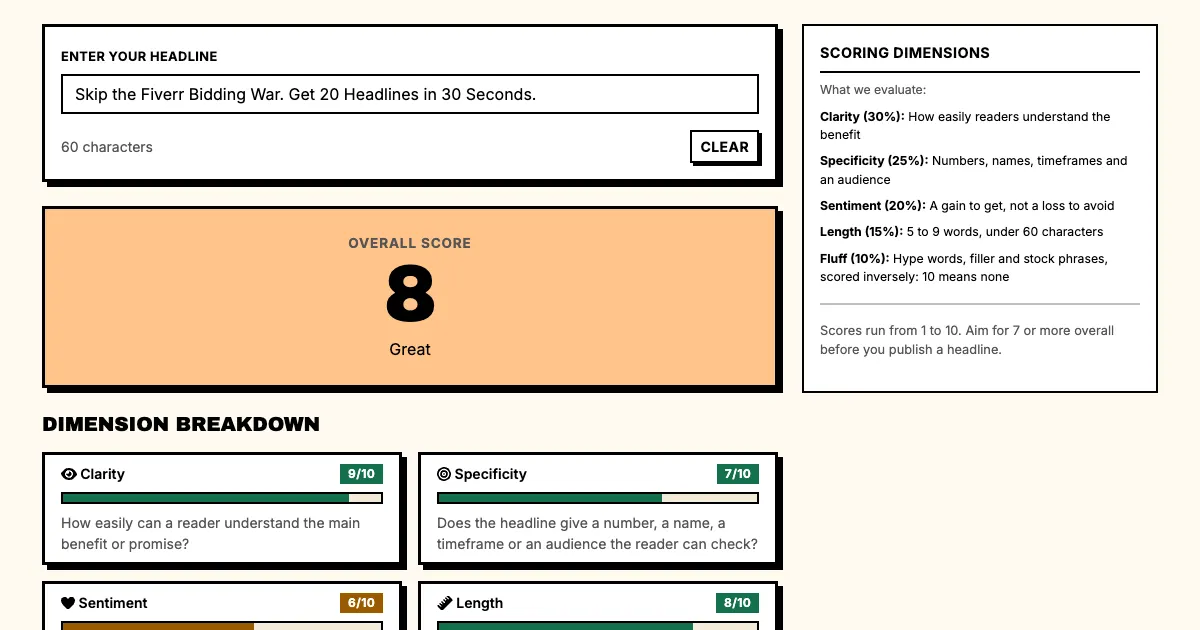
"Skip the Fiverr Bidding War. Get 20 Headlines in 30 Seconds."
Use this for buyers who are comparing you against freelancer marketplaces: name the competitor, then show the speed advantage.
9. The "Team sharing" formula
Show collaboration value.
Before:
"Agency Package"
After:
"Your Whole Team Uses One Account: Share Headlines, Split Credits, No Seat Fees."
Teams and agencies need to know they can collaborate without paying per-seat charges, and this headline promises that.
10. The "Time is money" formula
Quantify the time savings.
Before:
"Fast Headline Generation"
After:
"From Brief to Brilliant Headlines in 30 Seconds. Your Copywriter Charges $200/hr."
It frames your tool as a cost saver. The buyer who earns $200/hour sees your $10 price as a $190 net gain.
11. The "Honest pricing" formula
Build trust with transparency.
Before:
"Pricing"
After:
"No Hidden Fees. No Auto-Renew. No Surprises at Checkout."
This works for skeptical buyers who've been burned before. Call out the specific things they fear: "no" and "never" work as power words here because they take a worry away instead of adding hype.
12. The "Lowest cost" formula
Own the price leader position.
Before:
"Reseller Package"
After:
"50 Credits at $1.96 Each. The Lowest Cost Per Headline on the Market."
Use it only when you genuinely have the best unit economics. If you do, say it directly.
13. The "Seasonal" formula
Create urgency without fake countdown timers.
Before:
"Holiday Special"
After:
"Launch Season Is Here. Stock Up on Credits Before Your Competitors Do."
This works for time-sensitive industries, because the urgency is tied to their business cycles.
14. The "ROI calculator" formula
Make the math visible in the headline.
Before:
"Agency Plan"
After:
"1,000 Headlines for $98. That's $0.098 Per Headline. Your Client Pays $500 Per Ad Set."
Use it for buyers who will resell your output, and show them the markup potential.
15. The "Exit interview" formula
Position your tool as the alternative to leaving.
Before:
"Upgrade Your Account"
After:
"Running Low on Credits? Don't Start That New Campaign Without Backup Headlines."
This works for returning visitors who have used your tool before. They already know the value, so all the headline has to do is remind them to restock.
What does a full pricing page headline set look like?
Headlines by package:
| Package | Primary hook | Secondary hook |
|---|---|---|
| Starter | One credit test | Cheaper than Fiverr |
| Startup | 3 punches | Test multiple angles |
| Reseller | Scale across clients | Lowest per-headline cost |
The headline above the pricing table follows the same rules as the rest of your site. For 20 analyzed examples, see our breakdown of SaaS landing page headlines.
Multi-Stage FAQs
Q: Should I put prices in my headlines?
A: Yes, when your pricing is simple and your unit economics are good. "50 Credits at $1.96 Each" is more compelling than "Volume Discounts Available." Make the math obvious, because if your customer has to calculate the value, you've already lost them.
Q: How many pricing tiers should I have?
A: Three works best: a low-end entry point (Starter), a popular mid-tier option (Startup) and a high-volume option (Reseller). That matches the "good, better, best" pattern buyers expect.
Q: Should I highlight the middle option?
A: Yes. A "most popular" label on the middle plan gives undecided buyers a safe default, and the decoy effect shows how a third option changes which plan looks like the best deal. Buyers feel validated choosing the crowd's favorite.
Q: What about the FAQ section on my pricing page?
A: Put your FAQs below the pricing cards and use them to address the most common objections: "Do credits expire?", "Can I share with my team?", "What happens after I use all my credits?" and "Is there a free trial?"
Q: Should I offer annual discounts?
A: Yes, if you want recurring revenue. If your model is one-time purchases like Punchd, present that as a feature: "Pay once, use forever" is a selling point.
What should you do now?
- Pick your top 3 packages from the list above
- Write a "Before" headline for each (generic, boring)
- Write an "After" headline using the formulas that fit best
- Test them on your pricing page for 2 weeks
- Measure which package sees the most upgrades
Which formula works best depends on your audience. Starting from these patterns still puts you well ahead of "Choose Your Plan" and its cousins.
Sources
Want headlines for your own pricing page? The AI headline generator writes 20 variations from one brief.